Design, Programming, Music and Life

Showing posts with label code. Show all posts

Tuesday, October 30, 2012

APPS: The Adventures of making a showcase app for Windows 8 UI


Yesterday, I woke up knowing I would do something I have never done before, but not quite knowing what it might be. I started off the day, took the kids to school, and came home and cleaned up a little with Willow (More like, I cleaned, and she played the defensive linebacker role), so after she fell asleep, I climbed onto the computer and made up a quick and dirty mobile app for my church: Frontline Community It's still not done, but I at least got the basics in there, and can do a little of styling in Visual Studio now. 

Then I decided to take it a step further, and see what I can do to make a Windows 8 app. I put the basics into Joshfire Factory, and deployed it as a Visual Studio project. Opened it and instantly found that it didn't work. That's fine, I thought, I love a good challenge, so I was off looking to see if I can figure out why it didn't work. I found that much of the issues with the project were because it was using the old version of WinJS. I corrected every line that pointed to the old WinJS, and updated them to point to the location of the new version. I rebuilt and then clicked Run. 


Almost... There were a couple of issues still, like when viewing a section or page, and going back, you get the same content loaded behind the items on each section. Well that sux! 


So I dug a little deeper, and found out that it was not checking to see if the content was already loaded when it went back to the home screen, since I'm still a novice at this, I felt a simple CLEAR statement on load will do (I'm not too sure how to do a conditional statement just yet). That did the trick :)


Now all I have to do for it is fix the picture container when it loads the pictures from their sources, and also fix the YouTube stream from trying to use an ActiveX component... (Not even available, cant see why it defaults to it) and I'll be all set. At least I got somewhere in my ventures though, even though it is not 100% working, it is better than anything I've done with the OS thus far. (Minus a couple found registry tweaks :0)


Friday, October 12, 2012

Giving a webapp a try

Today I set out to make a web app. One that will pull a lot of the different media I have to offer online and present it all to the user in an easy to digest manner. Well, I have something along those lines, but not quite the experience I was rooting for at first. You can check out the latest version of my web app HERE. I will also be working on a Windows 8 app, just as soon as I figure out a couple things first.

If you are interested in making your own, Head out to joshfire ( http://factory.joshfire.com/)

Thursday, October 11, 2012

Revamping The Resume - Part 2 - Virtual Resume

11:53 PM Posted by Unknown , , , , , , , , , , No comments
One morning I was browsing my normal news sources when I came across Lifehacker's article about making a static resume and putting it on the web. I took that and ran with it over the last month in my spare time and came out with a good representation of my coding skills so far. Mix that with my Design abilities and I think I may have one of the key items I've been missing as a businessperson all along.

The site is 100% static HTML5 (CSS & JS) so it will run on 90% of the modern browsers out there. It uses a few types of animation too. One for the foreground and one for the background (which moves when the mouse moves, all 3D like). This is just version 1 of it so far, so I might have to revamp it a couple of times before I'm happy with it.

This is a link to my revamped resume jonwest.site44.com (mirror)

I plan on updating that as regularly as I remember, so leave a comment if you have any thoughts :)

Saturday, September 29, 2012

Fun with code: GPS tracking on the cheap

I have set out to learn a bit more about the Google Maps API and how to easily impliment a custom map into Joomla. After looking around quite a bit, I was not able to find anything I could use. What the client wanted was a simple map view showing where his drivers were. The thing about this though, is that they did not want to spend too much $$ on new equipment or GPS fleet tracking software, and he only wanted something simple.

After hours and hours of research and testing, I have found what I think to be the easiest way to impliment multiple KML layers into a single map and I will share my findings with you all too ;) You will need a few things first though, so open up a new browser tab and go install Google Earth if you haven't already. Once you have that, we are ready to get started.


Start by opening up the Google Latitude page, and sign up for a new Google ID per vehicle, biker, etc you want to track, and in Latitude, go ahead and set up a location. Click Privacy Settings, and set that to Detect Your Location. Then tap on the gear in the upper right.
Once you click the gear, choose Advanced Settings. This will open a new screen showing widget embeding options. At the bottom of that page, you will see a Developer Informaion link, click it. and select the KML link.
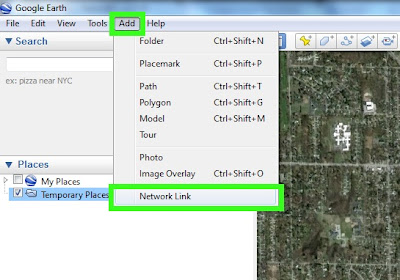

Now we will go into Google Earth and add that link. Across the top, go to Add, and then Network Link.


Then fill out the info for your location and on the Refresh tab, you can set up your refresh options for the location. It should look something like the dialog here.

Next we want to open a normal Google Maps page, and we will set up our route here. Enter in all the stops on the route, and when done, click Get Directions.
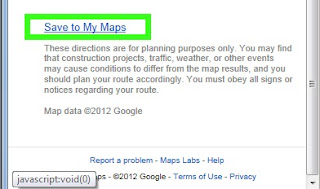
Once finished there, scroll down to the bottom of that left hand colum, and select the Save to My Maps link. Once that opens up, make sure you click the KML link, and save it to your computer somewhere.


We will then open up Google Earth, and open the saved KML file. This will show up in your Map view after imported. Repeat the process how ever many times you need to for trackers and routes, then save the setup as a new KML file by right clicking on the main group, and selecting Save Place As. Then upload the KML file to your server.

Once you have the KML file saved on your server, you will have to create a page to load and show it. Many of the solutions I found online needed a PHP file and an HTML file to function, well I found an easier way for this with just a simple HTML file.

<!DOCTYPE html>
<html>
<meta http-equiv="content-type" content="text/html; charset=UTF-8"/>
<title>Maps Example for loading a single KML file, or multiple KML files. </title>
<script type="text/javascript" src="http://maps.google.com/maps/api/js?sensor=false"></script>
<script src="http://ajax.googleapis.com/ajax/libs/jquery/1.5.1/jquery.min.js"></script>
<script type="text/javascript">
$(document).ready(function() {
initialize() ;
});
function initialize() {
  var myLatlng = new google.maps.LatLng(42.97112, -85.679208);
  var myOptions = { zoom: 14, center: myLatlng, mapTypeId: google.maps.MapTypeId.TERRAIN}
  var map = new google.maps.Map(document.getElementById("map_canvas"), myOptions);
  //Route1 Info
  var georssLayerR1 = new google.maps.KmlLayer('http://yourwebsite.com/maps/routes.kml', {preserveViewport: true});
  georssLayerR1.setMap(map);
}
</script>
<body>
  <div id="map_canvas" style="width:100%;height:500px"></div>
</body>
</html>

Once you have this set up, save the HTML file on your server, and you can load it in Joomla by making a simple Wrapper Widget, and setting the URL of the widget to be your saved HTML file.

That's about it for this lesson, if I missed anything, let me know ;)