Design, Programming, Music and Life

Showing posts with label programming. Show all posts

Thursday, April 18, 2013

Dreams of life on the other side...

10:58 PM Posted by Unknown , , , , , , , , No comments

I have been working part time as a Graphic Designer / IT guy and going to school full time for Application Development. Life has been a bit busy for a while now, and this being the last full two weeks of classes, it is also a tiny bit stressful. On the upside, I am working a job that gives me full creative freedom within reason, and I get to use one heck of a military grade computer while doing so. I do plan on showing some of my work there as soon as it is released, so you are just going to have to be patient a little longer.

I have also been donating my artistic and technical talents still at Frontline Community in Grand Rapids, and things there are also smooth sailing, in fact, this is the first church I have found that doesn't make an overly bureaucratic mess out of suggestions towards artistic direction and visualizing the message. Nice place, you should visit sometime ;) Anyways, I have a few pieces here that I can show from past / current series and a couple proposals for future series... (Will be adding more soon)


After this semester of school is over, my Wife and I plan on doing a role switching exercise, and she is going to be putting work on hold while I will be working full time for Rev-X Products and starting my own personal projects in app development. This will not be easy, since I have pretty much played the role of a stay/work at home Dad for almost three years, but I have all the faith in the world that this will work out for the best for all people involved, and this is where dreaming of life on the other side comes to play. What if this actually works, what if this can actually help us afford to spend time with each other more as a family.

Friday, October 12, 2012

Giving a webapp a try

Today I set out to make a web app. One that will pull a lot of the different media I have to offer online and present it all to the user in an easy to digest manner. Well, I have something along those lines, but not quite the experience I was rooting for at first. You can check out the latest version of my web app HERE. I will also be working on a Windows 8 app, just as soon as I figure out a couple things first.

If you are interested in making your own, Head out to joshfire ( http://factory.joshfire.com/)

Saturday, September 29, 2012

Fun with code: GPS tracking on the cheap

I have set out to learn a bit more about the Google Maps API and how to easily impliment a custom map into Joomla. After looking around quite a bit, I was not able to find anything I could use. What the client wanted was a simple map view showing where his drivers were. The thing about this though, is that they did not want to spend too much $$ on new equipment or GPS fleet tracking software, and he only wanted something simple.

After hours and hours of research and testing, I have found what I think to be the easiest way to impliment multiple KML layers into a single map and I will share my findings with you all too ;) You will need a few things first though, so open up a new browser tab and go install Google Earth if you haven't already. Once you have that, we are ready to get started.


Start by opening up the Google Latitude page, and sign up for a new Google ID per vehicle, biker, etc you want to track, and in Latitude, go ahead and set up a location. Click Privacy Settings, and set that to Detect Your Location. Then tap on the gear in the upper right.
Once you click the gear, choose Advanced Settings. This will open a new screen showing widget embeding options. At the bottom of that page, you will see a Developer Informaion link, click it. and select the KML link.
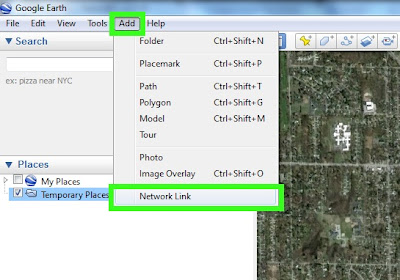

Now we will go into Google Earth and add that link. Across the top, go to Add, and then Network Link.


Then fill out the info for your location and on the Refresh tab, you can set up your refresh options for the location. It should look something like the dialog here.

Next we want to open a normal Google Maps page, and we will set up our route here. Enter in all the stops on the route, and when done, click Get Directions.
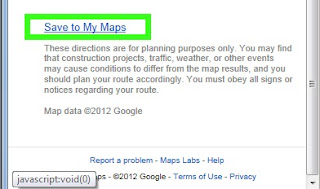
Once finished there, scroll down to the bottom of that left hand colum, and select the Save to My Maps link. Once that opens up, make sure you click the KML link, and save it to your computer somewhere.


We will then open up Google Earth, and open the saved KML file. This will show up in your Map view after imported. Repeat the process how ever many times you need to for trackers and routes, then save the setup as a new KML file by right clicking on the main group, and selecting Save Place As. Then upload the KML file to your server.

Once you have the KML file saved on your server, you will have to create a page to load and show it. Many of the solutions I found online needed a PHP file and an HTML file to function, well I found an easier way for this with just a simple HTML file.

<!DOCTYPE html>
<html>
<meta http-equiv="content-type" content="text/html; charset=UTF-8"/>
<title>Maps Example for loading a single KML file, or multiple KML files. </title>
<script type="text/javascript" src="http://maps.google.com/maps/api/js?sensor=false"></script>
<script src="http://ajax.googleapis.com/ajax/libs/jquery/1.5.1/jquery.min.js"></script>
<script type="text/javascript">
$(document).ready(function() {
initialize() ;
});
function initialize() {
  var myLatlng = new google.maps.LatLng(42.97112, -85.679208);
  var myOptions = { zoom: 14, center: myLatlng, mapTypeId: google.maps.MapTypeId.TERRAIN}
  var map = new google.maps.Map(document.getElementById("map_canvas"), myOptions);
  //Route1 Info
  var georssLayerR1 = new google.maps.KmlLayer('http://yourwebsite.com/maps/routes.kml', {preserveViewport: true});
  georssLayerR1.setMap(map);
}
</script>
<body>
  <div id="map_canvas" style="width:100%;height:500px"></div>
</body>
</html>

Once you have this set up, save the HTML file on your server, and you can load it in Joomla by making a simple Wrapper Widget, and setting the URL of the widget to be your saved HTML file.

That's about it for this lesson, if I missed anything, let me know ;)


Sunday, June 3, 2012

A life on the line

5:07 PM Posted by Unknown , , , , , , , , No comments
I'm trying to make myself remember to post more often, but it doesn't always happen the way I want it. This is also because I am trying to remind myself to stop working and spend more time with my Wife and kids. So it is a double edged sword, so to speak.

On the subject of employment and work, I have been happily helping out a local limo and party bus rental company with a couple websites they run. This job has been running for a couple weeks now, and I'm making a lot of progress on their sites. So far, I have mostly finished fixing all the issues with one site. The only thing left on that is adding a payment feature that somehow ties in to an old, unsupported version of Vacation Rental Script 4 (VRS4). And to make things worse, the PHP for the system has been obfuscated, and there is no record of the key... Well, there is that brick wall... So I have come up with a couple options for this: a) Pass the variable for current_property_rate to another system, like Paypal or Authorize.net, but I would have to set up a second site to handle just that one function, like a simple, but expandable Joomla site with a shopping cart and payment component. Or b) I could put a different custom package into each of the rental property listings that will just shortcut to a paypal or authorize.net payment form, but that will require me to calculate both a downpayment and pay in full number for every property by hand, and continue to do so for each new property. I so wish I could just add a payment function to this site as is. :(

Now that I am thoroughly depressed again, let's move on to some of the positive things I have done with the sites. I started a new Joomla site for the Rental Property site, already finished redoing the logo and designing a template for it. Added slideshow, payment, and rental property organization to the site already, and it will look great once I get the properties in there. But that requires a new expensive component that we are holding off on till I am ready. On the Limo and Partybus rental site, I have already finished building The site and getting 90% of the article info and links into the site. All I have to do on that is format the pages, and move the 100's of photos to a slideshow, sorted by article. On this site, I was able to build a seamless experience from mobile to full desktop browser, with no change in the UI. This is great for them, because it kills two birds with one stone, and saves me some time down the road as well as them some time in the future.

I still have to add up the time I spent on the web sites today, and get that sent out, but I at least got a whole lot of work done on it all this week, despite me being out of commission till Wednesday. I also got to save a friend from a live or death experience too! He had gone and updated his computer to the new Windows 8 release preview, and had lost years of photos in the process, so it was only a matter of time for the poor guy, before his wife would end his life for him, saving him the trouble of having to to do it himself. Me, being the nice guy I am, put my skills to work and was able to recover all the photos plus all of his documents and downloads too. Took me about 15 minutes, so not bad on time consumption. I am glad though that the fix was an easy one and he didn't actually loose everything in the long run. LOL, even though the thought of his wife beating him up is rather amusing.

Tuesday, May 15, 2012

Web Work So Far

Over the weekend, I was able to find a couple opportunities for web design and maintenance locally, so that was just awesome. I was also able to start working on ClientX's first website today, and although I got off to a rough start, I quickly got my bearings with the ancient art of PHP and Smarty templates, and got through 3/4 of their requests for the week. That was just my first day working on it too, so you could say that I had a rather productive day. One thing I do to help my productivity while I'm working from home is to set a single tone reminder to go off every 30 minutes. As I'm working, I will let it go through one or two dings before I get up and take a break for a bit. This also helps me stay on task when I'm away from my work, reminding me that I have to get back to it soon.

With this client, I am dropping a whole lot of hints to move towards a better CMS, instead of the custom made one they are using. I can imagine that they have spent thousands of dollars in the past per update because each time they want to add a new function, they have to hire a coder to code that function. Why? There is a whole world of components for systems like Joomla out there that are cheap to implement. That would save the client thousands of dollars over the next few years. Heck! They could even do most of this work themselves if they went that route.

 Another thing I'm kind of liking about this job, is that my contract reserves me the rights to blog my work, and even gives me the rights to all of my code too. This way I can share it if I want to. If I ever figure out how to implement a drop-down menu into this ancient system, I do plan on sharing the menu-box.tpl file. It's been a tough one so far, so I can't be the only one looking for a solution.

 That's about it for today. Things are moving, just have to wait for the road to go up the hill :)