Design, Programming, Music and Life

Showing posts with label iphone. Show all posts

Friday, July 12, 2013

iOS 7 - Feature: Use camera to redeem

9:08 PM Posted by Unknown , , , , , , , , , , No comments

So I stumbled upon a nice little feature in iOS 7 for my iPad & iPhone, and it is a much needed feature, redeeming a gift card through the camera on the device. I haven't seen much on this feature as of yet, so I figured I would post a few pics of the process.

When you hit the Redeem button in the App Store, you are asked to use the camera or enter a code manually to redeem a gift card. Once you hit the Use Camera button, it ises the front facing camera to identify the code on the back of the card.


Once it finds the code, it will show a box around it for a second, and then blink and show the text (not backwards) and then ask for your account password.


Once the password is confirmed, the box will turn blue and then the camera view will close and go back to the App Store's redeem dialog.


That's about it! Nice feature for iOS 7 I think, and gone are the days of entering a redeem code 2-20 times until it takes :)

Friday, October 12, 2012

Giving a webapp a try

Today I set out to make a web app. One that will pull a lot of the different media I have to offer online and present it all to the user in an easy to digest manner. Well, I have something along those lines, but not quite the experience I was rooting for at first. You can check out the latest version of my web app HERE. I will also be working on a Windows 8 app, just as soon as I figure out a couple things first.

If you are interested in making your own, Head out to joshfire ( http://factory.joshfire.com/)

Friday, September 28, 2012

How to avoid the iOS 6 update wiping all your contacts

I'm back again with another helpful hint for updating to iOS 6. In some cases, the iOS 6 update is erasing all the contacts off the iCloud account, and that is never a good thing to have happen, so I have a nice and simple solution for this just as a precaution.

The only thing you will need for this solution is a Gmail account. Once you have that set up, we will need to get out your iOS device and go to Settings>Mail, Contacts & Calendars> and Add New. Set it up as an Exchange account, and use m.google.com as the server. Make sure you also use your full gmail address as the login/account too. When it confirms connectivity, just select Contacts, and whatever else you dont have syncing already.

Next we want to give it time to sync all your contacts to Google's servers, after that, you will want to go to Settings>iCloud> and make sure it is turned on, everything is selected, and you have a recent backup. If you dont, do it now, and walk away for an hour.

Once done, you are all safe to Restore and Update your iOS Device. If something goes wrong with the update, and all your iCloud contacts are wiped, you have Google's exchange set up already syncing them anyway. (Personally, I turn off iCloud Contact Sync because it has a tendency to double my contacts randomly) Just make sure once the update is done, you select Restore from iCloud and you will be all set ;)


Friday, September 21, 2012

How to get Google Maps back on iOS 6 (sorta)

9:18 AM Posted by Unknown , , , , , , , No comments
Since iOS 6 has dropped, the main complaint I am seeing so far deals with the lack of Google Maps and the replacement with Apple's own brew of maps. But the accuracy and inclusion of metro areas has been a bit buggy in some areas, so I'm going to show you how to get a form of Google Maps back on the device.

This is a super simple and easy trick to get a shortcut to googles maps services onto your homescreen. Start off by opening Safari, and in the address bar, type "maps.google.com", Googles server will redirect you to their mobile maps, and then from there, all you have to do is tap the share icon, and then tap on "Add to Home Screen", (It might even prompt you if you're lucky). That's it! Now you can navigate all areas that Apple Maps won't let you.

Drop me a commen or share if this helped you out at all ;)

Wednesday, September 19, 2012

A basic iOS 6 heads up

12:04 PM Posted by Unknown , , , , , , , , , No comments

Today is the day, and as most of us Apple users get ready for the release of iOS 6, I thought I'd take the time to cover a few basics. 
  1. It will be available OTA. Over the years, those poor Apple Tech Support people have been sent out to the slaughter on days like today, all because the majority of iOS users all still use their computers to backup and restore, Hardly any of you still have iCloud set up for backing up your device. Please do yourself a favor before updating, Make sure you have iCloud set up and that you have a recent backup in the past couple days, if you don't... DO IT NOW!!!! Then save you and those Apple Technicians some time and headaches by going to Settings > General > Software Update > and check for your update there (WiFi Needed).
  2. If you don't have WiFi, you’ll need iTunes 10.7. Apple released the next version of iTunes a little bit ago, but if your computer is anything like my Families, the software update in iTunes did not work right. What you will likely need to do is go over to the iTunes download page and grab a fresh copy. http://www.apple.com/itunes/download and then install it on your computer. This will make sure your computer can read your iPhone after the update, and if you don't have WiFi, it will allow you to update the old fashion way. 
  3. Backup, Backup, BACKUP!! The worst thing you want to have happen is you go through with all this and you then found out you never backed up your device. I suggest using iCloud for backups, but if that is not an option for you, make sure you do a backup the old fashion way through iTunes. You can force this by right clicking on your devices name in the left hand side, and selecting Backup. 
  4. Delays are the name of the game when millions of people all try something at once. It's best to just be patient, and keep trying if the update fails. Try, try again until it finishes, but don't interrupt the process, this can cause damage to your device. Just ride it out, and if it gives an error, start over.
  5. You are going to want at least half power to start the process. A good rule of thumb is to charge your iOS device to at least 30% before starting an update. I say 50%, because you never know what can go wrong, and its a bad thing to loose power half way through an update. You might have to learn hot to enter DFU mode as a weekend project if that happens. 
  6. Some of your apps might have bugs after the update. Just exercise caution here, not all app developers have gotten their app caught up to iOS 6 compatibility, but they are likely to get there eventually. If you come across any of these apps, just try not to use them until you notice an update from the App Store for them. 
  7. Apple being vague? Never!! They just don't mention the release time. In the past couple years, Apple has released the update at 1:00 EST (10:00 PST) , so it's a good bet that it will happen today around this time. If you haven't received your update by this evening, it likely means you have a firewall issue, or you have a DNS issue. Good luck ;)
That's about it for the iOS 6 heads up, I hope this helps a couple of you out there. 

Monday, July 2, 2012

One down, three to go!

Dadds.com site design and update

The site I have been poring my hard work into lately is finally finished. And by the time this post goes live, the site will be live as well hopefully. The biggest part of this project was taking all the old info and updating it for newer devices and services. I implemented a payment portal, HTML5 slideshow, a kick butt content editor, and a couple easy ways to incorporate videos and slideshows easily. So let's start with a small before and after of the website. 

Home page

Here is the old homepage layout for Dadds.com 

And here is the new layout. We have minimized the focus on the page to the opening article, and replaced all the various banners and text info with a few dynamic modules that will automatically adjust to the article size. 


Limo-bus 25 page

Here is a sample of one of the pages on the old dadds.com. This page is about one of their limo-buses. The actual info did not start until you scrolled down a couple pages worth. 


This was fixed with the new design. All of the slides/pictures are contained in a basic slider that scrolls by its self every few seconds. 


Wedding Services Page

With this page, it was the same as all the others, laid out for one screen size, Gallery and videos took up most of the page, and the content was taking up a small part of it. 


With the slideshow implemented, and the modules around the content, we can see a good portion of the content right off the bat. This is a good thing here. 


Other Examples

Here are a few more examples for how the site looks now with a large resolution screen. This is how it would appear on 60% of the computers viewing it.


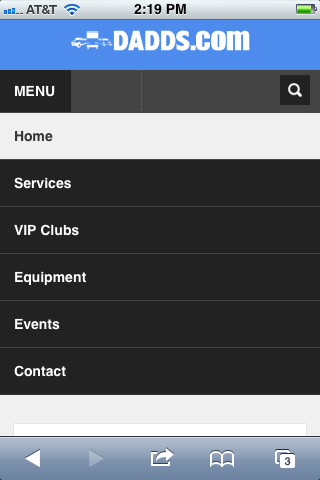
Mobile Phone Layout

Here are a few screens for how the site layout adjusts for mobile devices. These are what the view on a basic iPhone will look like. The only thing I'm not happy with on this view is that the pictures are still using a 650 width. If I use 100%, I get a slideshow the width of one row/module. So it is one or the other here :)


Mobile Tablet Layouts

When you view the site from a tablet, the format also shifts and you get a couple different content sizes depending on if the site is viewed in landscape or portrait mode. 


Friday, April 20, 2012

Google+ widget WIP

12:36 PM Posted by Unknown , , , , , , , , , , No comments

So I have been working a bit more on my Google+ widget for iOS. Right now I am using it inside Dreamboard and it is very usable. Sometimes though, the frame likes to use the screen size instead of the window size, but I will figure it out. I think it is not too shabby for only spending 20 minutes on it a month :) Maybe if I'm lucky, I'll get an offer for something that will help me afford more time on it. (hint,hint) Here are some pics of what I have so far.